I ran across a problem this morning and after scouring the internet found NO ONE who had an answer. So, I am posting it here in case anyone else has a similar problem in the future.
Running: iTunes 10.5.2 under MacOS X 10.7.2
Triggering Event: Due to my own lack of attention, I allowed my hard drive to run out of space. When iTunes tried to update its library file, it was unable to do anything due to lack of space and posted an error something like "Unable to complete operation because the file can not be found." (At the time, I did not know this would cause a larger issue, so I did not capture the exact text.)
Symptoms: After this point, new media (movies, TV shows, music) could not be added to my iTunes library. I could drag it onto the window, download it via Home Share, etc. - and it would go to the right folder - but it would never show as part of my library. Attempts to manually run the media via drag-and-drop from the file system were successful, but they were not visible in iTunes nor by AppleTV.
Resolution: It appears that the problem was a corrupted "iTunes Library.itl" file. To correct:
1. I identified the time of the last successful add to my iTunes library (select the movie, and select File/Get Info, check the Info tab)
2. I closed iTunes
3. I went to the folder %hard drive%/Users/%username%/Music/iTunes
4. I located the current "iTunes Library.itl" file
5. I renamed the file to "iTunes Libary Bad.itl"
6. I used Time Machine to navigate back to my backups to a time just AFTER that successful add.
7. I selected the "iTunes Library.itl" file from the backup, seleted it, clicked [RESTORE] (lower right of your screen)
8. When asked where to place it, I selected the same folder from step #3
9. There was a pause while the file was retrieved from backup
10. I opened iTunes and noticed all of my settings were back to before the hard drive issue
11. I went to %hard drive%/Users/%username%/Music/iTunes/iTunes Music
12. I located the media I wanted back in my library (movies are in the "Movies" folder INSIDE the "iTunes Music folder")
13. I dragged and dropped the media onto the iTunes window
14. The media appeared correctly in the window
That's it. Hope this is useful to someone, someday.
Tuesday, December 20, 2011
iTunes Problem: Won't add new items to library
Thursday, December 01, 2011
CarrierIQ: Your SmartPhone Is Spying On You
I've been tweeting about his for days, but it is now big enough that this issue requires a blog post. Independent security researchers (and hackers) have discovered a rootkit installed to most smart phones sold by the major American cellular carriers. Called CarrierIQ, this rootkit monitors and captures nearly everything you do on your smart phone including your location, every phone number you call, every web request you make, every key you type, and every App that you run. It has been found on Android phones, WebOS phones, BlackBerry phones, and other Nokia phones. It is unclear what information is actually being sent to each carrier, but there is the capability here for your carrier to literally know everything you do with your smartphone, whether you're on their network or on Wifi.
(Apple iPhones appear to have less-extreme version that tightly controls what is gathered and can be turned off in the Settings app. It is important to note that Google's stock Android phones (Google Nexus line, etc.) are clean of this rootkit. It is being added by manufacturers and carriers.)
This scandal is still blowing up, and it is unclear what the final fallout will be. But it appears your wireless carrier - in the name of improving service - may have been spying on nearly every aspect of your online life.
NOTE: To turn off CarrierIQ on your iPhone, go to Settings, General > About > Diagnostics & Usage, click "Don't Send". If you want to see what is being sent, check out "Diagnostic & Usage Data" instead. (At this point, I am leaving mine set to "Automatically Send."
Wednesday, November 09, 2011
Adobe Surrenders in the Flash Wars
When the iPhone was released, Apple was castigated for one serious omission in their otherwise superlative web browser - THERE WAS NO FLASH PLAYER! Flash had been an important part of making the web more interactive. Surely, Steve Jobs wouldn't exclude this important technology, right? "Not so," pronounced Apple, "HTML5 could do everything Flash did, and better, with superior battery life for mobile devices." The critics grumbled, but consoled themselves that eventually Apple would come around. And competing mobile Operating Systems made "Flash support" a central part of their marketing campaigns.
Five years, five iPhones, and two iPads later, Apple still hasn't included Flash and yet remains the dominant player in the mobile space (although Android now ships more phones). And Adobe? Adobe has surrendered, ceasing all development of Flash for Mobile Browsers. Instead, they will focus all efforts on enabling developers to build Apps and deploy HTML5 solutions.
Thursday, October 27, 2011
iOS 5 Tips: Getting all iMessages on BOTH your iPhone AND iPad (or iPod Touch)
One of my biggest frustrations on upgrading to iOS 5 was finding out that - unlike the demos that Apple had up - iMessages sent to my iPhone 4S were not appearing on my iPad, and vice versa. A major attraction of iOS 5 is the ability to have all of your messaging on all of your devices, and yet the promise remained unfulfilled. But several hours of trial and error finally worked it out. Here's hoping this TIP saves you the trouble that I had. (This is especially likely if you were a .Mac user who upgraded to Mobile Me, but kept both your Me.Com and Mac.Com addresses.)
TIP: HOW TO SYNC iMESSAGE ACROSS MULTIPLE DEVICESImportant Note: This will ONLY sync iMessages between your iPhone and other iDevices. Text Messages will not sync.
As a default, iMessage on your iPad always goes back to your Apple ID. But as a default, iMessage on your iPhone always goes back to your phone number (to aid in making the SMS/iMessage divide seamless). The key here is to sync up settings on both devices to use your Apple ID for all iMessage functions. (And if you have multiple Apple IDs, to make sure the SAME ONE is selected on both devices.)
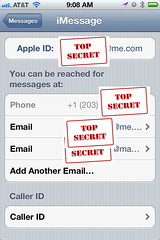
STEP 1: Go to the SETTINGS app on your iPhone, iPod Touch, or iPad, and select MESSAGES (scroll down, it is under Safari and above Music in iOS 5.0)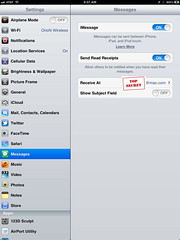
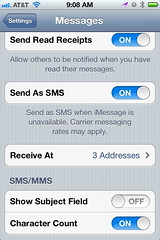
STEP 2: Tap the RECEIVE AT setting (which will show one more Address count on your iPhone than on your iPad/iPod Touch). This will bring up a list of the addresses at which you can receive iMessages.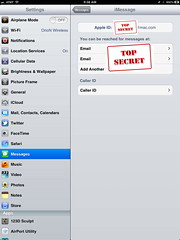
STEP 3: Make sure all Apple IDs are set up on all of your devices. Tap "Add Another E-mail" if you have multiple and one is missing on any device. This will ensure that your device is "listening for" any messages coming into any of those channels. (You can not add a phone number to your iPod Touch or iPad. Sorry.)
You will now be able to receive messages on all devices sent to any of your designated e-mails/Apple IDs.
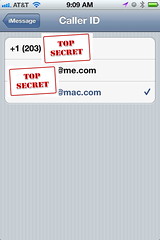
STEP 4: Tap the CALLER ID Setting. This will bring up a list of addresses you can send out to other iMessage devices to say "This is me, reply to this." On your iPhone, your phone number is probably selected.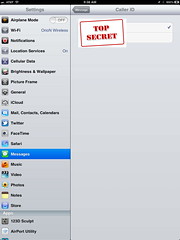
STEP 5: Select the SAME e-mail address on both your iPhone and your iPad/iPod Touch. Do not leave it set to the phone number.
You will now tell all future iMessage friends to reply back to your chosen e-mail. This will cause them to message you in a way that both your iPhone and your iPad/iPod Touch can understand.
Wednesday, October 26, 2011
iOS 5 Tips: Location Based Reminders & Microsoft Do Not Mix!
While we were being victimized by the infamous hacker, I was busy upgrading my iDevices to iOS 5, and ran across some small issues that it is likely Mod-Blog readers have also (or will also) face. Thus, our return will begin with a small series of IOS 5 TIPS, based on my experience.
TIP: LOCATION-BASED REMINDERS AND MICROSOFT EXCHANGE DO NOT MIX!Also, remember that Location-based alerts are only compatible with the iPhone 4 or iPhone 4S. If you have an iPad, or older iPhone, reminders can only be time-based.
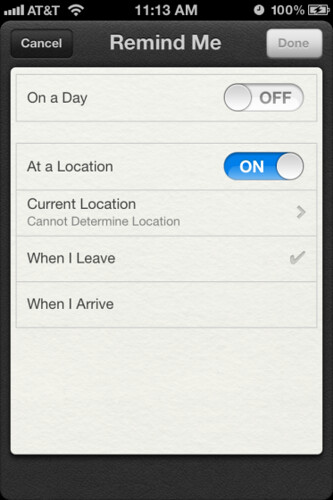
One of the big new features of iOS 5 is system-based reminders, which can be either time or location-based. Locations based reminders are great for keying you to do a certain things "when I get to work" or "the next time I go out". They can even be set up via Siri, if you have an iPhone 4S.
But when I got to iOS 5, I found no way to set a location-based reminder. Every attempt to set one up via touch or via Siri failed entirely. I wasn't even given the option. And yet, there was no indication of an error or failure.
Well, it turns out the issue was the fact that I was syncing my Reminders (as Tasks) to my work's Microsoft Exchange server. This is automatic if you have an Exchange e-mail account set up. But Exchange is incompatible with iOS5's method of storing geographical information. This is mentioned in Apple's documentation, but buried deep and hard to find.
The simple solution? Turn off syncing of Reminders with the Exchange server. Sync with iCloud instead. Once that is done, the option for location-based reminders will "magically" appear.
Thursday, August 25, 2011
Welcome to a Post-Steve Jobs Apple
It has been coming a long time - his illness has been quiet but well-documented, and he has been on medical leave 3 times - but it was still a shock to see the headlines: Steve Jobs resigns as CEO of Apple. Today likely begins a panicked sell-off of Apple stock, as touchy investors flee a company without the iCEO at the helm. But tomorrow likely begins a smug buy-up of all open Apple stock by bargain hunters, who realize Jobs leaves Apple with a well-trained executive team, molded in his own image, with a strong vision for the future.
First, as an Apple investor and owner of Apple products, I want thank Steve for his many years of service. A life is not to be judged on its wealth, which can be accrued thru virtue or thru sin. But a life is to be judged thru its accomplishments, and Steve has had many. He was part of the personal computer revolution with the original Apple. He was part of the GUI revolution with the Macintosh (technically starting with LISA). He was part of the network revolution with NEXT computers and then the iMac. And he is at the forefront of the mobile revolution with the iPod, iPhone, and iPad. Few men have lead through more transformations of the way we live and do business, and few have kept a consistent focus on customers.
Second, I want to reassure my fellow Fanboys that Apple will not die without Steve at the helm. Tim Cook has been CEO for several years now, de-facto, and the iRevolution has been as much about the executive team he leaves behind, as it is about Steve himself. Surely, he was the unifying visionary behind it, but there are many years of that vision left to go. I doubt the iPad is the last "One More Thing" to come out of Apple... perhaps not even the last one this year.
Third, I want to encourage Mod-Blog readers not to lose sight of the real base of this story. It is NOT a CEO resigning, or a visionary stepping down, or a world-class business changing hands. It is a human being fighting a difficult illness. Likely in the process of dying (although Steve Jobs is notoriously private about such things). Please be praying for him and his family - for healing if it be God's will, or for comfort if it is his time. While others are hand-wringing about supplies of the iDevice they lst after, let us show compassion for the man himself.
My thoughts. I am interested to read yours in the comments, or on Facebook, Twitter, or Google+.
Wednesday, April 20, 2011
Your iPhone/iPad is watching you!
In scary Big Brother style, it turns out your iOS cellular enabled iPhone or iPad is tracking your every movement. The database found keeps data from the moment iOS 4 is installed, and appears to track even times when GPS location is not turned on (likely using cell tower triangulation).
Skeptical? I used this sample app to pull the data from my own iPhone. The image below. Note it's careful documentation of my trips to Bath and Houghton, NY, Lancaster, PA, Cherry Hill and Wildwood, NJ, and Delaware. Of course, my own privacy is not breeched because I had already posted photos from each of those trips here to Mod-Blog or to my twitter feed.
Please note, getting this info requires access to your device OR to any computer (Mac or PC) which your iOS device has synced with.
Friday, October 08, 2010

Sunday, September 19, 2010

Wednesday, September 01, 2010
Apple revamps all iPods, Apple TV
If you missed today's Apple Event(liveblog, video, here are the high points:
- iTunes 10 announced with new "Ping" social network
- New (tiny) iPod Shuffle
- New (tiny) touchscreen iPod Nano
- New (full sized) iPod Touch with HD camera and FaceTime
- New Apple TV with streaming, including NetFlix
- iOS 4.1 for iPhone and iOS 4.2 for iPad with bug fixes, Game Center, and Apple TV integration
- Unimpressed with "Ping" - I don't need ANOTHER social network
- iPod Nano seems almost too small. Teens will miss the camera from the last model.
- iPod Touch with Cameras will kill the Flip Video market completely. Worthy upgrade.
- New AppleTV looks nice, but I think I like Roku HD better.
- Looking forward to iOS 4.1, but 4.2 on iPad may be too late coming in November.
Thursday, July 22, 2010

Friday, June 25, 2010
The origin of the iPhone 4's signal problems?
Fans of government intervention and regulation believe that it is possible to create complex guidelines for businesses which give us only benefits and no detriments. But the reality is that every government regulation has an unintended consequence and one antenna designer is suggesting an FCC regulation is behind the reported iPhone 4 antenna issues. It may explain several other mysterious decisions behind Apple's designs in previous generations.
Just about every cell phone in current production has the antenna located at the bottom. This insures that the radiating portion of the antenna is furthest from the head. Apple was not the first to locate the antenna on the bottom, and certainly won't be the last. The problem is that humans have their hands below their ears, so the most natural position for the hand is covering the antenna. This can't be a good design decision, can it? How can we be stuck with this conundrum? It's the FCC's fault.I can confirm that I have seen this issue with my iPhone, and it now appears Apple has acknowledged the issue. But it is interesting to see how it came about, and the pressures that may have justified it. In the meantime, many users are looking into cases to alleviate the issue.
You see, when the FCC tests are run, the head is required to be in the vicinity of the phone. But, the hand is not!! And the FCC's tests are not the only tests that must be passed by a candidate product. AT&T has their own requirements for devices put on their network, and antenna efficiency is one of them. I know because I have designed quad-band GSM antennas for the AT&T network. The AT&T test similarly does not require the hand to be on the phone.
So, naturally, the design evolved to meet requirements - and efficient transmission and reception while being held by a human hand are simply not design requirements!
Tuesday, June 15, 2010
iPhone 4 Preorders Ready to Go
There were quite a few problems this morning - the U.S. Store was going up and down and up and down - but things appear to have stabilized now. If you want to preorder your iPhone 4, you may get it here. The real thing ships for June 24.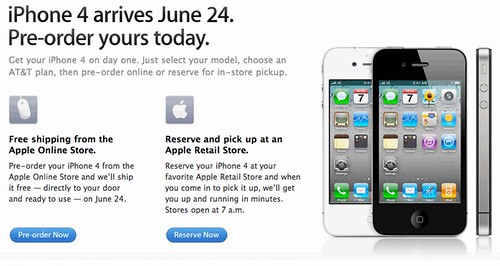
Update: You can also attempt to order you iPhone 4 thru the new Apple Store app. But the process still seems flaky on both the web and the app for now.
Wednesday, June 09, 2010
AT&T leaks personal information for iPad 3G owners
Every day, the choice of AT&T as exclusive partner for Apple seems like a worse and worse decision. Not only have they dropped the unlimited data plans for iPhone and iPad, but now they have leaded personal information for iPad 3G owners. This is a very serious security breach, and affects many, many powerful people. It is time for Apple to take AT&T to the woodshed, or else open up the deal to other providers.
The breach, which comes just weeks after an Apple employee lost an iPhone prototype in a bar, exposed the most exclusive email list on the planet, a collection of early-adopter iPad 3G subscribers that includes thousands of A-listers in finance, politics and media, from New York Times Co. CEO Janet Robinson to Diane Sawyer of ABC News to film mogul Harvey Weinstein to Mayor Michael Bloomberg. It even appears that White House Chief of Staff Rahm Emanuel's information was compromised.
It doesn't stop there. According to the data we were given by the web security group that exploited vulnerabilities on the AT&T network, we believe 114,000 user accounts have been compromised, although it's possible that confidential information about every iPad 3G owner in the U.S. has been exposed.
Monday, June 07, 2010
WWDC Announcements
The 5 cent summary:
- iPhone 4 with "retina display" screen, HD camera, new design - $199 starting price with 2 year contract on AT&T - on sale June 24
- iMovie for iPhone ($4.99 from App Store)
- iPhoneOS has been renamed to iOS
- iOS 4 goes Gold Master today, releases June 21
- iBooks coming to iPhone/iPod Touch with iOS 4
- iAds to enable more free/low-cost Apps, coming July 1
- FaceTime - Video calls over Wifi (3G in 2011)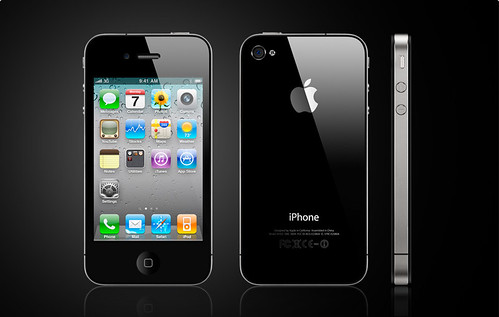
Wednesday, June 02, 2010
Nomad's Data Usage for on AT&T for iPhone
With AT&T's announcement of the end of "unlimited" data plans, new iPhone buyers will have to choose between a 200 MB and a 2 GB data plan. I thought Mod-Blog readers would be interested to see how much data I have been using.
I blame the recent spike in data usage on my new love for Evernote.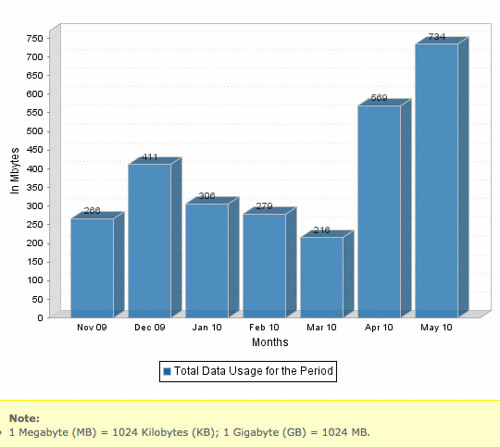
Tuesday, June 01, 2010
Google is phasing out Windows in favor of MacOSX
The reason given is security. Apparently, after the Chinese Hack, the company is looking for any operating system with a better security record than Windows. Then again, maybe it is simply an attempt to make nice with Steve Jobs, after the anti-iPhone screeds at Google I/O. (Linux is also an approved alternative to Windows at Google.)
New hires are now given the option of using Apple’s Mac computers or PCs running the Linux operating system. “Linux is open source and we feel good about it,” said one employee. “Microsoft we don’t feel so good about.”You can expect an exasperated quote from Steve Balmer shortly.
In early January, some new hires were still being allowed to install Windows on their laptops, but it was not an option for their desktop computers. Google would not comment on its current policy.
Windows is known for being more vulnerable to attacks by hackers and more susceptible to computer viruses than other operating systems. The greater number of attacks on Windows has much to do with its prevalence, which has made it a bigger target for attackers.
Thursday, May 27, 2010
Is the Windows Era over?
I have made no secret of my animus against the Windows operating system. I use it only at work these days - and am stuck on Windows XP for the most part. But I still find it hard to use the operating system without being constantly needled by its poor design, poor efficiency, and lack of respect for the user.
But now many are arguing that the end of the Windows Era is here with the rise of Google "in the cloud", Apple in the smartphone/iPad space, and HP's high-profile purchase of Palm for webOS. They predict that we are past the peak of the Microsoft mountain, and will be watching a slow slide to irrelevance in the next 10 years.
Microsoft lumbers along, avoiding risks, clinging to Office and Windows revenues. Meanwhile, companies without Microsoft's existing monopoly-bound customers drive change, and they are willing to take risks. The mobile-to-cloud service platform is to the PC what the PC was to the mainframe: It extends computational and informational utility to more people and places -- and for lower cost. The Windows era is giving way to the anytime, anywhere, on-anything era. The most dynamic innovations are occurring outside the Windows monopoly...To be clear, the end of Microsoft's dominance does not necessarily mean the beginning of an Apple Computer era. Google is well-poised for dominance, there are a number of alternative OSes out there like webOS and Android, and with Linux it is becoming increasing cheap for anyone to start from scratch in inventing their own Operating System for their own custom device.
HP already has announced a WebOS-based tablet. HP's next, logical step is to release a laptop running WebOS. Losing HP is bad, but there may be more trouble coming. Sony is yet another traitor in the making. Last week, Sony announced plans to support Google TV by offering a television running Android. As part of a recent reorganization, Sony execs responsible for VAIO PCs are in charge of TVs. OS migration from Sony smartphone (the Xperia X10) or Google TV-based television to tablet or PC is logical next step. What about Dell, which already has adopted Android for smartphones? Windows is bloated and moribund compared to these lither mobile OSes pushing up into the PC market.
Monday, May 10, 2010
A Week with the iPad Wifi + 3G
It has now been a little over a week since I received my iPad (a Wifi + 3G model), and I have had it with me almost constantly since then. This seemed like a good time to sit down and put down some thoughts.
- The iPad is your real "notebook computer". Steve Jobs wanted to position the iPad between your cell phone and your laptop or desktop computer. And it really is excellent for the sweet spot where until now you have been carrying around a paper notebook or clipboard. With tools like Evernote, you can take notes at meetings, classes, or in church and have them ready to access anywhere. With apps like Kindle or iBooks, you have a library of reference or fiction books. With apps like Paperdek, you can even capture sketches or your new ideas.
- The lack of multitasking makes the iPad a tool, instead of a toy. While there are plenty of great games for the iPad, but its lack of multitasking actually makes is a better productivity tool than would otherwise be possible. If you're taking notes on it, you can't quickly jump off in the middle of a meeting to chat on AIM, post to Facebook, or play a round of golf without losing your place in the notes. This encourages focus, and actually means less distraction than using a normal laptop for the same job.
- The battery life transforms the experience. My first workday with the iPad - without a plug available - I was on 3G checking e-mail, surfing the web, and using apps literally from 5:30 AM to 4:30 PM and still had 20% of my battery left at the end of the day. This kind of freedom is absolutely distinct from any of my laptops, or even my iPhone. It means I never have to worry about the current state of my iPad's battery. Amazingly freeing.
- 3G is worth the price of admission. I have friends with Wifi-Only iPads, and they love them. But it is impossible to overstate the utility of having always-on, always-there internet at all times. I am always connected, always able to look up the info I need, always able to get that important e-mail. And yet, the fact that the contract is month-to-month means I am not locked into it, if my financial situation changes. I'll be traveling next weekend and staying in a hotel without internet... and yet will stay fully connected to my friends and family.
- Yes, it's "just a big iPhone" and that's a good thing. The iPad can run almost any iPhone app, but give a larger space for that app to work. But the well-developed user interface is intuitive and well-defined. Even the new iWork apps feel familiar due to the established standards of the iPhoneOS. And being built from the ground up for security, stability, and connectivity means it has none of the legacy problems of Windows or the MacOS X systems.
Thursday, April 29, 2010
Steve jobs drops the Blog Bomb on Adobe
It is a rare thing when Steve Jobs bothers to comment on anything that is not his own product. But apparently the criticism over Apple's banning of Adobe's Flash and Cross-Platform Compiler from iPad and iPhones was enough to get him typing. The bottom line: Flash is not on the iPhone/iPad, it's not COMING to the iPhone/iPad, and Adobe had plenty of chances to change Apple's mind in the past.
Flash has not performed well on mobile devices. We have routinely asked Adobe to show us Flash performing well on a mobile device, any mobile device, for a few years now. We have never seen it. Adobe publicly said that Flash would ship on a smartphone in early 2009, then the second half of 2009, then the first half of 2010, and now they say the second half of 2010. We think it will eventually ship, but we’re glad we didn’t hold our breath.Between this battle and the Gizmodo legal troubles, Apple seems to have decided it likes being the center of all media attention. Good or bad.